

For many buildings, the BMS is the operational control centre. If water risk sits outside it, incidents can be missed, response becomes slower, and evidence for governance is harder to produce. LeakNet is designed to integrate into building operations so water events can be treated like any other critical system, with clear alarms, status points, and a documented response trail.
This whitepaper explains how LeakNet connects into a BMS, what signals you can expose, and how to approach integration across single buildings and portfolios.
What “BMS integration” means in practice
BMS integration usually has two levels:
- Alarm and status points into the BMS
This is the most common requirement: the BMS receives clear signals when there is a water risk event and can show whether isolation has occurred. - Operational workflows aligned to alarms
Once the BMS sees the alarm and status, your response process becomes consistent: notify the right team, confirm isolation state, record the event, and plan rectification.
LeakNet supports this first level directly through BMS outputs for alert and valve status.
The simplest integration: BMS outputs for alert and valve status
The LeakNet Gen2 Control Panel (LKN2) includes BMS outputs for both Alert and Valve Status.
Crucially, the specification states these are provided as volt free contact outputs for both signals.
What that gives you?
In practical terms, this approach allows your controls contractor or BMS engineer to bring LeakNet into the BMS as standard points such as:
- Water leak alert (active alarm condition)
- Isolation valve status (open/closed, or normal/isolation state)
You can then display these points on graphics, include them in alarm routing, and incorporate them into on-site operating procedures.
Why volt free contact matters
Volt free contacts are widely used in building systems integration because they are straightforward and compatible with many BMS input modules. This reduces integration friction and avoids needing custom data translators for basic alarm and status visibility.
How LeakNet behaves during an incident (and why that matters for BMS)
LeakNet is designed as a prevention system, not just an alarm. It can automatically close an isolation valve to prevent water damage.
It also includes a two-stage alert approach described as a remote alert before shut-off, which is specifically useful in operational environments where you want to reduce unnecessary disruption while still acting fast when risk is real.
From a BMS perspective, this matters because you can align BMS actions and operator decisions to clear states:
- Alert present: investigate quickly
- Valve isolated: incident contained, proceed with response workflow
In other words, the BMS is not just displaying an alarm. It is showing where the building sits in the containment process.
Offline operation and BMS continuity
Not every site wants reliance on cloud connectivity for core protection. We also have an offline mode where LeakNet can function using preset thresholds for time, volume, flow rate, inactivity, with additional capabilities available when online.
This is important for BMS integration because it supports a robust operating model:
- The building can still generate local alerts and status signals
- The BMS can still display and route those points
- Core risk control does not depend on internet availability
Your BMS remains the on-site operational layer for alerting and status, while online features add depth such as richer diagnostics, history, and multi-user sharing.
Integration design considerations
BMS integration is rarely just wiring. Good outcomes come from clear design decisions.
1) Decide what you want the BMS to do
Most teams start with:
- Receive alarms
- Show isolation status
Some sites also want:
- Alarms mapped by zone or area
- Escalation rules based on occupancy hours
- Building specific SOP prompts within the BMS alarm response screen
LeakNet supports multi-zone approaches and central account management, so zoning in the water network can be reflected in how alarms are structured and responded to.
2) Map points to zones that match operational reality
The BMS should help people act quickly. That means alarm points should be named and grouped in a way that aligns with how your teams think:
- Plant room supply
- Landlord supply
- Floor level
- Riser
- High risk areas such as boosted water or pool plant
This reduces response time and reduces unnecessary shut-offs that create disruption in the wrong areas.
3) Define the response workflow
The technology is only half of “integration”. The operational workflow is the other half.
Your SOP should typically define:
- Who receives the alarm and at what priority
- Who is authorised to re-open supply after isolation
- How incidents are recorded and closed out
- What constitutes a maintenance follow-up versus an emergency call-out
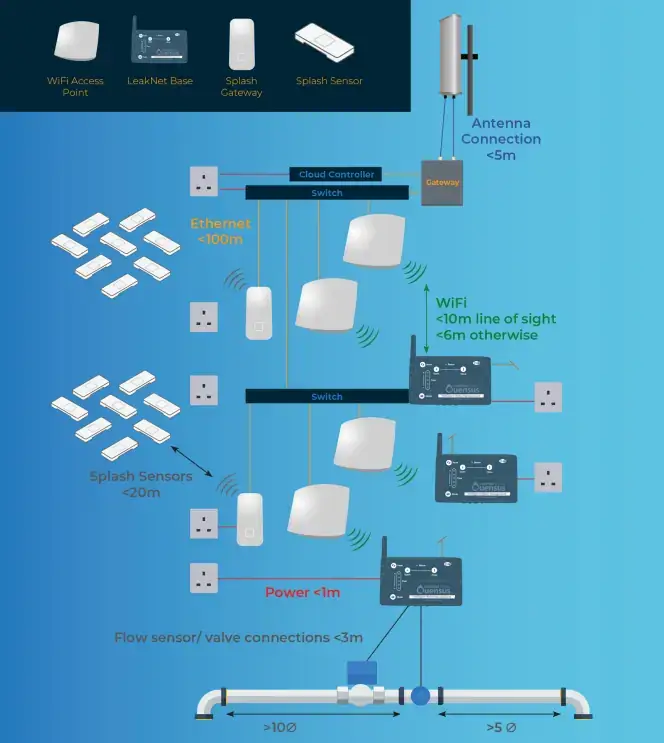
A typical large project topology incorporating 100s LeakNets and SplashSensors may look like this:
What to ask for when specifying LeakNet
If you are writing a requirement for your MEP consultant or BMS contractor, keep it specific:
- Provide BMS points for Alert and Isolation valve status from the LeakNet control panel.
- Confirm point naming conventions by zone and how those zones map to building drawings
- Confirm how alarms will be routed (BMS alarm pages, email/SMS escalation, out-of-hours handling)
- Confirm the operational process for isolation and re-opening the supply
Summary: how LeakNet ties into a BMS
LeakNet connects into a BMS by providing straightforward BMS outputs for alert and valve status, specified as volt free contact outputs. This makes it practical to bring water risk into the same operational environment as other building systems. Combined with automated isolation, two-stage alerting, and offline capability, the result is a more resilient and governable approach to escape-of-water risk.
If you have any questions, please reach out to the team!